
A better Photoshop grid for responsive web design
Posted on 20 January 2012 • 90 comments
In making the move to responsive web design, one of the potential hurdles is the rather awkward maths for calculating the percentage-based widths necessary for fluid layouts. If, for example, you’re designing with a 960px grid in Photoshop and you have six columns, each 140px wide, you divide 140 by 960 to get your percentage-based width: 14.583333%. Now, I don’t know about you, but numbers like that look a little scary. It doesn’t matter that there are great calculation tools built into TextMate to do the maths for you; the point is that the final figure looks like an arbitrary number with no immediate relation to either the container’s pixel width (960) or the element’s pixel width (140).
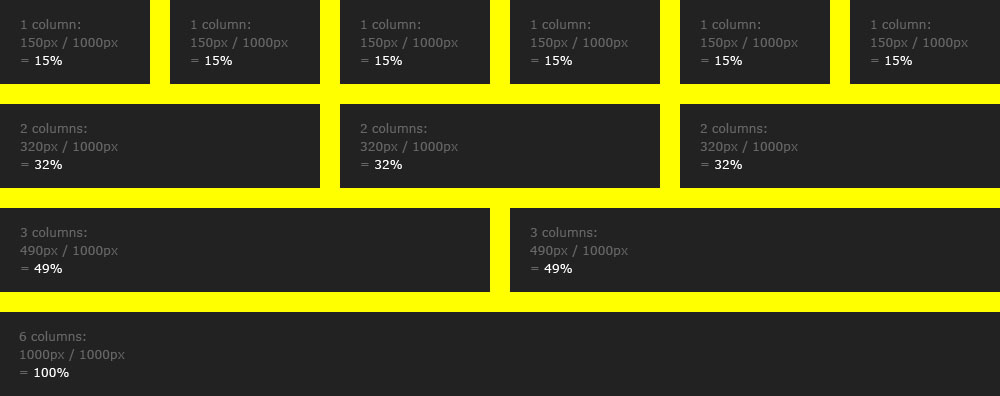
Compare that to a container that has a width of 1000px. 1000 is a nice, easy, round number. Dividing by 1000 results in clean percentages and better still, dividing by 1000 is something we can do in our heads: just remove the zero. A 140px column inside a 1000px container is 14%. A 500px column in a 1000px container is 50%. 320px is 32%. Easy!
Here’s the PSD. And, in the interest of showing how a static Photoshop file can translate into a fluid web page, here’s an HTML demo.
But what about our precious 960 grids? I hear you cry. That holy number has served us perfectly well, dividing easily into multiple columns and accounting for browser chrome on 1024 screens to define an accepted ‘safe area’. But the 960 grid was born in a world of fixed-width layouts. If we’re building fluid designs, the simple reality is that your grid can be whatever size you want, because we’re concerned only with relative widths. The days of worrying about absolute widths have passed.
I should point out here that I’m not proposing a new framework. In fact, I’m not even saying that we should all start using grids whose containers are specifically 1000px. The point is that it’s about making our lives easier, and 1000px happens to be an extremely easy number to deal with.
Caveat 1: margins
A small caveat is that the 1000px grid assumes you’re not bothered about gutters on either side of the container, which might bother some people depending on the way you do your column margins. I’ve included guides in the PSD to indicate where they’d usually be, if that helps. I expect some people will also complain about there only being six columns, but personally I like to keep things simple: nice big numbers and nice big columns. Adapt as you see fit.
Caveat 2: rounding errors
In Webkit browsers, an error with the way the rendering engine treats percentages means that although we’re dealing with whole numbers, the widths can actually appear as if they’re slightly off:

If you’re a pedant, this might keep you awake at night, but I tend to take a more pragmatic approach to web design and accept that a little inconsistency never killed anyone. In the example the misalignment is obvious because of the way the columns are shown, but in the real world it would barely be noticable, especially when dealing with ragged-right type.
I’d love to know if you find this useful!
90 comments
katie
20 January 2012 @ 05:28PM #
Wonderfully simple approach to what might else be a massive headache. Trying to break into responsive design myself so this is very helpful!
Dave Rupert
20 January 2012 @ 05:47PM #
Great post, Elliot!
I’ve noticed the rounding inconsistencies as well, it’s particularly bad in Opera. Near as I can tell, this is a really old sub-pixel problem. Maybe we can lobby our browser friends for better support of sub-pixel calculations since ratios and proportions are becoming more important in modern web design. The method that Firefox is using seems to perform the best.
Alan Houser
20 January 2012 @ 06:19PM #
Yes— great post! Thanks for the math(s).
Jen Wilhelm
20 January 2012 @ 06:32PM #
This will be perfect for when you want to design a site that fills a wider portion of the screen (even more than 1000px) to target users with high screen resolutions (like myself). Thanks!
Andy G
20 January 2012 @ 07:05PM #
[speaks with developer hat on] I love to see websites that conform to a grid, have consistent line heights, borders and all that design-in-perfect-proportion stuff. But if I’ve learned anything from #naconf in the past 2 days it is that “we” should be prepared to push out into the unknown and stretch the boundaries to roll with the punches of a dynamic canvas. Nothing is fixed, nothing is regular. Call it responsive, call it a pain in ass [arse], but the norm has changed and shifted. Move with it, or move ahead of it if possible.
Not “responsive layout”.“Adaptive design”.
Kev Adamson
20 January 2012 @ 07:16PM #
Nice.
I tend to use inline-block instead of floating, and wondered if this might inadvertently fix the sub-pixel issue. It didn’t.
I’d say this needs fixing urgently, especially with the uptake of responsive layouts, and the big part percentages will play in many cases.
Steve
20 January 2012 @ 09:06PM #
Nice,
Simple is good. Lets stay simple.
Andy Owen
20 January 2012 @ 10:57PM #
I like the simplicity of this as a starting point – 1000 pixels is much easier to work with, and the template is a useful demonstration of how the canvas can be divided up. For anyone wanting to incorporate margins (or increase the size of gutters) within the 1000 pixel width, you’ve demonstrated that it’s easy enough to adapt your example.
As a more extreme example, I worked with a canvas of (25) 40 pixel columns for a recent design. This unit became the base for my margins, gutters and wider content columns, which were then (mostly) converted to percentages, of course!
Alexandru Nastase
21 January 2012 @ 01:43AM #
It really gave me a new view on how I imagine and design my websites, thanks Elliot, simply brilliant.
Cheers!
Tieson Wooten
21 January 2012 @ 02:06AM #
Great article! Kicked me in the rear to create my own PSD layout for a responsive site. Thanks!
Aghosh Babu
21 January 2012 @ 05:19AM #
What happens if one uses this layout and set a maximum width of 960px to a root container ?
Tebbott
20 January 2012 @ 05:45PM #
After NAConf yesterday, I promised myself I’d make more of an effort with responsive design, and this has just given me a brilliant starting point. Cheers Elliot.
Josh Green
20 January 2012 @ 05:48PM #
Lovely article Elliot, thanks for taking the time to write this. I think this gets the closest I have seen to what I would describe as a easy to use framework of CSS for the purposes responsive web design.
Joris
21 January 2012 @ 11:09AM #
Thanks for putting this out. I just got started with my classic 960 grid, but then calculations start becoming a mess quickly. I’ll now take the 1000px as a starting point and see where this goes. Look like a great solution to my problem, thanks Elliot.
ZonTonk
21 January 2012 @ 04:52PM #
Great one mastah, but Not working well in IE
Jon
21 January 2012 @ 06:20PM #
Simple, elegant, beautiful grid! Thanks for a great post.
toribloger
21 January 2012 @ 09:19PM #
Simple and really useful! Thank you
Adam Wilson
21 January 2012 @ 12:29PM #
As a traditional designer who has just always accepted the 960px grid as ‘the way’ this is refreshing. I’m starting on this on Monday, 1000px does just sound lovely.
The old newspaper designer in me kind of wants to adapt this to an 8/16 column grid though, might see what I can come up with.
Jozsef Deak
21 January 2012 @ 09:00PM #
Thanks, helped me a lot. Just working on some fluid site and the whole rounding stuff caused me a lot of headache. Now I see things a bit differently
shreejaya
21 January 2012 @ 10:45AM #
Thanks for sharing with us.
Adam Wilson
22 January 2012 @ 10:41PM #
Ah ha, for those of you wanting a few more columns, could all just be divided by 2 again, making this a 12 column grid. This way you get a few extra options:
1 column = 65px (handy for white space)
4 column = 235px
Andrés Botero
24 January 2012 @ 09:43AM #
Thank you! is nice to hear someone else thinks the same.
I stopped using the 960 grids in my last two projects, I had the same issues you spoted.
Thank you for the psd, very useful.
Ryan Glover
25 January 2012 @ 01:52PM #
Thanks for sharing this, Elliot. Your note about percentage inconsistencies in Webkit really helped me to understand some issues I’ve had in the past (I found myself tweaking numbers to get it ‘just right’ every time). Excited to grab the PSD and try a new approach.
Sanchit Gupta
23 January 2012 @ 04:13PM #
Great Post! Thanks :)
David Ashkanasy
26 January 2012 @ 04:02AM #
I appreicate this template and will give it a go for the projects that require extensive design prototyping.
That said – I’ve found that my workflow process has had to change significantly when it has come to responsive web design, with PS in particular leading to excessive additional work to show the changes as well as not being relfective of real world possibilities. The past year has seen me change to mostly HTML prototyping, after wireframes, with elements being imported directly from photoshop.
I find there are just far too many variables with responsive web design for a static display system like PS to handle.
Is this just me? Or has PS begun to run its course as a prototyping tool for web design?
Andreas Sauer
27 January 2012 @ 12:38AM #
Elliot,
belive it or not. I’ve had a similar idea a few weeks ago, but i never got around realizing it. Oh, me and my lazy behind.
I hope you don’t mind me being so impertinent to mix in my thoughts by fiddling with that container a bit…
div.container {
background: yellow;
margin: 0 auto;
overflow: hidden;
width: 960px;
padding: 0 2%;
max-width: 96%;
}
I’d modify the outer container to have paddings of 2% each to the left and right. I’d also would add a maximum width to the container, because on multiple occasions I ran into buggled clients, that ran their browsers on 23+ inch screens in fullscreen.
That way the grid would also break down into the rightfully beloved 960px, and any smaller common denominator.
I think Safari’s rounding behavior can be treated using floating values for the grids, maybe by further correcting the total width at the the div.row div:last-child. I’ve fear what IE’s idea of that’ll be, though.
Luke Connolly
30 January 2012 @ 09:07PM #
This is one of those “so simple it’s genius” ideas. I agree that repeating decimals just feel wrong… this is a wonderful solution. I can’t wait to steal it and pretend that I came up with it. :)
Kieran
30 January 2012 @ 11:10PM #
Thanks! This is The last reason to start and try fluid layouts
Enrique García
30 January 2012 @ 11:24PM #
I like nestable grids, and percentual margins just don’t allow those – The width of the margins in the interior grids get gradually smaller, while I usually want them constant-sized.
Is there a way to have the percentages in the margins relate to the “root container” while the dimensions of the cells relate to their container?
Gene Locklin
31 January 2012 @ 01:25AM #
Thank you.
As someone who uses a large screen, I’m always happy to see ideas that push beyond 960. Now, if we can just find a way to get people to bump up their text size, as well .
I’ve created a Gist of your grid, albeit slightly amended, as a SASS mixin. https://gist.github.com/1708004Cheers.
Ron Waldon
31 January 2012 @ 01:31AM #
[insert comparison to Imperial-versus-Metric debate here]
Sorry, couldn’t resist. :P
Francesco @ Fornace
31 January 2012 @ 01:36AM #
I love it when is easy :)
Enrique, you could experiment with paddings, I suppose.
Fraser
31 January 2012 @ 03:39AM #
Awesome!
The 1 col, 2 col etc terminology confuses me though. And it doesn’t quite allow for a quarter / three-quarter split of the full width.
I’ll definitely use your idea in my dev work/play but probably use whole, half, third, quarter, sixth etc
Kinda like this.
http://farser.com/img/share/ejs_1000px_responsive_grid-with-quarters.jpg
Joel Evans
31 January 2012 @ 03:57AM #
Brilliant, although as with most responsive layouts, there’s a limit to how far it’ll stretch before you get horrid, unreadably-long lines of text… but I guess that’s what max-width is for (or does that violate the principles of RD?)
Either way, responsive layouts are certainly becoming more mainstream — a sign of how far and fast the web is changing now that IE6 is tumbling into the eternal flames of browser hell, and we can finally breathe easy when using display:table-cell, inline-blocks, and floats.
Bert Smith
31 January 2012 @ 05:47AM #
I’m still fairly new to web design, but when I first started and learned about the 960 px default layout even as a beginner the numbers and fixing the sizes for each element seemed a bit daunting. I from the beginning just went ahead and went with the 1000 px. Great post and fantastic insight!
Michael Shmichael
31 January 2012 @ 09:14AM #
Would it be fair to say that this is more “fluid” than responsive?
In that it doesn’t account for the “responses” involved in “responsive” design.
Just sayin’…
Stephen
31 January 2012 @ 09:14AM #
Thanks for sharing ..
Espen Brunborg
31 January 2012 @ 09:17AM #
Good idea this, though I’d feel restrained by the relatively small gutter width, which is one of the reasons I dropped 960 a while back (now I’m using 978 or the modular grid). The one thing I don’t get though, is the insistence on 1000px width or, indeed, 960. Sure, this makes sense when you’re dealing with pixels, because you want your columns to be nice even pixel numbers – but isn’t it completely irrelevant when it comes to percentages? I mean 15% is 15% no matter how you look at it, right? Who cares if that translates to 148 or 150 px… Furthermore, as we’re talking responsive design, whatever width you set will presumably change by definition – throwing pixels further out the window.
Also agree with other comments on the lack of a 4-way split – but that should be easy enough to work out.
Great contribution!
Petar Acanski
31 January 2012 @ 11:09AM #
Great stuff!
It is better treatmen for IE8 if you change logic div:last-child to first-child {margin-left: 0;}
Binyamin
31 January 2012 @ 11:12AM #
http://static.elliotjaystocks.com/responsive-grid/html-demo/ is fine just on Firefox and IE9.
The best solution would be CSS3 Flexible Box Layout http://www.w3.org/TR/css3-flexbox/, but it will take time till it will be fully supported http://caniuse.com/#search=flexbox and the must featured browsers will be only-used browsers http://gs.statcounter.com/#browser_version-ww-yearly-2011-2012
Edson
31 January 2012 @ 01:17PM #
Man! I didn’t realize that we could deal with a rounded value (like 1000px) just to specify the %s. It’s so obvious!
I’ll keep these two sentences in my mind from this moment on:
1. The 960 grid was born in a world of fixed-width layouts.
2. The days of worrying about absolute widths have passed.
Thanks for the enlightening article!
Simon
31 January 2012 @ 01:26PM #
What you doing in that hole?
Great article, thanks :o)
Simon
Colin Oakes
31 January 2012 @ 03:19PM #
Great post Elliot! This definitely makes the math a lot easier, 1000px makes way more sense then 960px for a fluid layout.
Only problem is that your code currently does not work in IE7, not sure if that would be an easy fix (IE overrides) or not but would be that much more useful if it did support IE7.
corfu webdesign
31 January 2012 @ 05:50PM #
useful article for an unusual subject..thanks
egiova
31 January 2012 @ 07:12PM #
As it seems, I think it’s a perfect match with “blucss framework”(http://www.designlunatic.com/projects/blucss/) who took the same “math” approach.
I totally agree about your comments on 960gs grid, and your hypothesis is simply clearer on a fluid world. Just as they said: keep it simple (among other things).
Have a good day.
Morten Brunbjerg Bech
31 January 2012 @ 08:33PM #
Man! That is so simple and obvious, I’m almost embarrassed I’ve never thought of it.
I’m definitely going to try it out. Thanks for sharing.
lukens
31 January 2012 @ 11:34AM #
@MICHAEL SHMICHAEL – I thought the very same thing when viewing the demo. It’s certainly not what I’ve come to think of as “responsive web design”. I think of responsive web design as techniques such as content stacking to change the layout and flow of the page (see http://trentwalton.com/2011/07/14/content-choreography/), rather than just squishing the columns up on a smaller screens. I not saying something like this grid doesn’t have its place, but I think it’s some way away from what is generally referred to as “responsive design”. I may also be missing something about how this fluid grid could be used in conjunction with other techniques (if so, maybe a demo to show this would be good?).
Dan Malarkey
31 January 2012 @ 02:02PM #
Thanks so much Elliot for this article. I am a web designer trying to move into the development world, and I believe this will help me. I appreciate it!
-Dan
Mayur Chaudhary
31 January 2012 @ 06:12AM #
Great Post! Though i am not bothered about Caveat 1 when dealing with fluid design.
Dan Malarkey
31 January 2012 @ 02:15PM #
Thanks so much Elliot for this article. I am a web designer trying to move into the development world, and I believe this will help me. I appreciate it!
-Dan
Alastair Hodgson
31 January 2012 @ 10:23AM #
Nice little grid, I like that fact that it’s 1000px base width, but can quite happily stretch bigger or smaller an retain it’s proportions.
Doing a a quick browser test and I was surprised to see that this actually looks flawless in IE9! I was shocked too lol, Firefox comes in a close second with opera and webkit not handling it as good, the top row of small columns suffering most.
Good stuff E.J.S, Thanks
Jeff Finley
31 January 2012 @ 07:06PM #
I wish I saw this post sooner before I dove into designing our first responsive site. I made my own grid and tried to figure things out, then we ended up trying to work with the 1140 responsive grid framework.
Johannes Viström
31 January 2012 @ 08:59PM #
I really like the simplicity. I’m definitely going to try it out on my new projects.
Thanks for sharing.
Bjarni Wark
31 January 2012 @ 11:00PM #
Thank you for the clear explanation of what you have done and sharing this online, this is definitely one for the tool box.
In simple after reading it made it so easy to follow that if I was to have 30 pixel gutters ( I like the touch of extra space for gutters, depending upon content of course) then the math was very simple, 30px gutters @ 1000px means CSS { margin:0 3% 3% 0; } and adjust columns % width accordingly, very simple indeed you have made this.
Now some homework about about responsive images to go with the 1000px layout.
Bjarni Wark
31 January 2012 @ 11:33PM #
Oh just to add to the above comments, having gutters at 30px { margin:0 3% 3% 0; } makes wonky math for column percentages.
A nice addition to your layout could be to set max-width:1000px on the container.
Bjarni Wark
31 January 2012 @ 11:38PM #
Thank you for the clear explanation of what you have done and sharing this online, this is definitely one for the tool box.
In simple after reading it made it so easy to follow that if I was to have 30 pixel gutters ( I like the touch of extra space for gutters, depending upon content of course) then the math was very simple, 30px gutters @ 1000px means CSS { margin:0 3% 3% 0; } and adjust columns % width accordingly, very simple indeed you have made this.
Now some homework about about responsive images to go with the 1000px layout.
dj
01 February 2012 @ 04:07AM #
Just FYI… there is NO margin problem like you mentioned in either Firefox OR IE9, nice to know covering 98% of my viewers – also FYI, it seems like (for me at least) IE6 has gone to where vanished objects go – that is to say into a state of non-being. Last monthly stats showed 0% ie6. How about for you Elliot – are you close to 0?
dj
01 February 2012 @ 04:07AM #
Just FYI… there is NO margin problem like you mentioned in either Firefox OR IE9, nice to know covering 98% of my viewers – also FYI, it seems like (for me at least) IE6 has gone to where vanished objects go – that is to say into a state of non-being. Last monthly stats showed 0% ie6. How about for you Elliot – are you close to 0?
Jack
01 February 2012 @ 05:03AM #
If you have a fixed-width container then percentages is a stupid idea because the numbers will never change. Use a regular, pixel-based design and save somebody the headache of trying to read your terrible CSS.
Rich Dooley
01 February 2012 @ 08:56AM #
@Jack: Have you taken the time to read the 12 whole lines of ‘terrible’ CSS in the demo? There’s not a fixed with in sight! The idea here is that everything is based on being a percentage of 1000px to make for easy maths, then the .container div is set to 90% to make the whole thing fluid.
Don’t focus too much on the 1000px thing folks, that’s only for doing the initial maths.
Thanks for this, Elliot. This really is a useful resource for developing a basic fluid grid to fit all screen sizes.
Tom
01 February 2012 @ 09:06AM #
That’s neat, I like.
One thing worth noting: as a bare minimum, if you’re stuck with a 1024px wide screen, and still using Windows XP, majority of browsers viewports are below 1000px, so there will be some tiny amounts of horizontal scrolling.
(For example, IE6-8 have a viewport of 993px by my measurements)
Great for forward thinking though :)
Wil Linssen
01 February 2012 @ 01:19PM #
Hi Elliot
A few of us at Erskine put a grid generator together recently, it actually uses a lot of the same principles herein. It also lets you change the parameters of your grid (padding / gutters / media queries etc.) on the fly.
You might find it useful, or you might have some feedback. Either way, take a look: http://gridpak.com/
Udit Goenka
01 February 2012 @ 05:24PM #
This is quite an awesome technique Elliot. After reading your article, I have been playing the whole day with the % and it seems to work very nicely.
Thank You :)
derry birkett
01 February 2012 @ 12:27PM #
(caveat 2) Yikes! What is that! Webkit better get its sh+t together – nobody uses firefox anymore! And what designer could sleep (as you say) with that jagged column action going on… it’s like a pea under the mattress!
btw How’s Bristol? Spent my uni days there and miss the old place…
Adam S.
02 February 2012 @ 07:54AM #
Thanks so much for this, makes it a lot easier! Keep up the good work!
Jan
03 February 2012 @ 06:49AM #
You really had a good knowledge about web design. This is very good information. Good effort. Thanks for sharing.
ChrisPlaneta
03 February 2012 @ 11:43AM #
Hi Elliot,
Every now and again the subject of grids returns like a boomerang. They surely have some good aspects but also a lot of disadvantages.
Grids are like false friends. Even though they let you progress with the development quicker they are very limiting. Only if properly applied they can be a valuable addition to the repertoire of designer’s tools.
First of all adding all these classes to the markup – apart from being non-semantic – cripple your possibilities to apply mobile-first approach with media queries (I hope you know what I mean).
If it is speed of development that you are going but you still need the flexibility of applying dimenstions for media queries than you should definitely check out LESS. Don’t add classes to your HTML. Instead apply repaeted blocks of styles to your CSS. This is also a solution of how to properly use grid dimensions in the mobile first approach. But, let’s leave it for now.
Second of all, you are limited by the 12, 16 or X columns you work with.
I don’t know if you’ve heard about a Universal Grid used by chance of latest BBC sites redesign. They use there 61 widths dimentions – not columns. I will get back to it later in the text.
Thirdly, if you are using grids based on percentages, there is the rounding error of some browsers – especially Opera is very weak in this area.
Here, I developped a nifty solution called NegativeGrid that may not be a definite solution to this problem but it sure makes the width differences much smaller.
Please, don’t take it as a way of self promoting myself but but I believe you should really check out these links to posts on my blog.
You can check NegativeGrid with appropriate code generator if you want a classic approach to grids http://chrisplaneta.com/freebies/negativegrid-fluid-css-grid-by-chris-planeta/.
If I got you interested you might want to take a look at the BBC Universal Grid and generate your code here: http://chrisplaneta.com/free/bbc_universal_grid_generator/
Few. I wanted to make this comment shorter but it went godzilla.
Best,
Chris Planeta
ChrisPlaneta
03 February 2012 @ 11:43AM #
Hi Elliot,
Every now and again the subject of grids returns like a boomerang. They surely have some good aspects but also a lot of disadvantages.
Grids are like false friends. Even though they let you progress with the development quicker they are very limiting. Only if properly applied they can be a valuable addition to the repertoire of designer’s tools.
First of all adding all these classes to the markup – apart from being non-semantic – cripple your possibilities to apply mobile-first approach with media queries (I hope you know what I mean).
If it is speed of development that you are going but you still need the flexibility of applying dimenstions for media queries than you should definitely check out LESS. Don’t add classes to your HTML. Instead apply repaeted blocks of styles to your CSS. This is also a solution of how to properly use grid dimensions in the mobile first approach. But, let’s leave it for now.
Second of all, you are limited by the 12, 16 or X columns you work with.
I don’t know if you’ve heard about a Universal Grid used by chance of latest BBC sites redesign. They use there 61 widths dimentions – not columns. I will get back to it later in the text.
Thirdly, if you are using grids based on percentages, there is the rounding error of some browsers – especially Opera is very weak in this area.
Here, I developped a nifty solution called NegativeGrid that may not be a definite solution to this problem but it sure makes the width differences much smaller.
Please, don’t take it as a way of self promoting myself but but I believe you should really check out these links to posts on my blog.
You can check NegativeGrid with appropriate code generator if you want a classic approach to grids http://chrisplaneta.com/freebies/negativegrid-fluid-css-grid-by-chris-planeta/.
If I got you interested you might want to take a look at the BBC Universal Grid and generate your code here: http://chrisplaneta.com/free/bbc_universal_grid_generator/
Few. I wanted to make this comment shorter but it went godzilla.
Best,
Chris Planeta
Patrick
03 February 2012 @ 05:52PM #
This is fantastic…the rounding errors drive me batty. Thanks for sharing!
Ron Rattie
03 February 2012 @ 06:00PM #
Another reason not to worry about the 960px grid.. most screens being sold are wide screens. Mostly in a 16:9 ratio instead of the old 4:3 ratio. With that, you tend to have users scrolling more vertically and not horizontally. So a 1000px base grid shouldn’t really bother too many people surfing the web.
Michel
04 February 2012 @ 10:04AM #
The approach is certainly interesting!
I tested in latest Firefox, Opera, Safari, Chrome, and also IE8 (just in case).
Only Firefox gets the % right.
Opera, Safari, Chrome and IE, all of them have issues: IE8 simply doesn’t show the layout correctly at all; but let’s ignore IE for now, and return to all standards-compliant browsers:
Opera, Safari, Chrome: All of them do not calculate % correctly so when I resize their windows, they often show wider/narrower columns, change margins incorrectly, etc. If I make a design with text mostly, the “1000px = 100%” idea will work great, and no one will see anything. If, however, I need to see near-perfect alignment of elements, this won’t work well… :-(
So it’s not only Safari. modern browsers except Mozilla Firefox, cannot calculate this 1000 thing properly…
Ideas, how this might be fixed/improved?…
Javier Lo
04 February 2012 @ 03:13PM #
Amazing approach! This could be very useful!
Sanjay
04 February 2012 @ 03:33PM #
Cool approach! This is really helpful.
Danielle spinks
03 February 2012 @ 09:54AM #
I think the fluid but fixed 1000 px example is excellent. Also, adaptive design will become more and more important but could look very messy and unwieldy without understanding these fundamentals. Thanks for the post.
Tobias
04 February 2012 @ 04:35PM #
it sounds that easy that sometimes i am wondering why human beings sometimes need so long for coming up with such ideas…thanks a lot from the ones (including me) that sometimes think way to complicated =)
Carlo Rizzante
05 February 2012 @ 02:56PM #
Seriously man, what the heck, you’re always source of good stuffs and inspiration.
Thanks for sharing your thoughts. I’m playing with responsive since a while at various degree and I do like your approach. Neat and rational.
There are so many sides that need to be properly handled when going responsive, like images. How does it work in your vision, Elliot? I would really like to read your thought about this other aspect.
By the way, great job on Smashing Magazine, if I’m right you leaded the redesign.
Have a good February ;)
Carlos Ballena
05 February 2012 @ 07:12PM #
very interesting idea. I like how compact and efficient it is. I think it’s a great concept, applying the rule to the parent element and letting it cascade to the children.
It’s sad that at the same time this limits the design to rows with even column widths. In order to create different widths you would need to add more classes which would kinda defeat the purpose.
Still, very neat. there are definitely some scenarios where this code would apply beautifully.
May I suggest adding mobile support so that at smaller sizes the width’s adapt to the screen. So for example, the row with 6 columns, would become 2 rows of 3 columns, then 3 of 2, and eventually 6 of 1. It would prevent text from being too crammed and the code is rather simple to implement.
Great work, thanks for sharing!
Fotoclipping Web Design House
06 February 2012 @ 07:26AM #
Wonderful ,blog, thanks for sharing.
Pete in Atlanta
06 February 2012 @ 08:30AM #
for IE7 & 8, it appears that maybe the rendering engines don’t understand % based widths that contain decimals.
Here’s a hack that I’ve made some progress with:
the hack works for ie8 and below.
it’s the /9 that does the work.
.column1{
width:19.123%;
width:19% \9; /* IE8 and below /
}
use the same technique for margins:
.column1{
margin:0 2.1234% 2.1234% 0;
margin-right:2%\9; / IE8 and below /
margin-bottom:2%\9; / IE8 and below */
}
Pete in Atlanta
06 February 2012 @ 08:51AM #
for IE7 & 8, it appears that maybe the rendering engines don’t understand % based widths that contain decimals.
Here’s a hack that I’ve made some progress with:
the hack works for ie8 and below.
it’s the /9 that does the work.
.column1{
width:19.123%;
width:19% \9; /* IE8 and below /
}
use the same technique for margins:
.column1{
margin:0 2.1234% 2.1234% 0;
margin-right:2%\9; / IE8 and below /
margin-bottom:2%\9; / IE8 and below */
}
Boris
06 February 2012 @ 01:07PM #
Thanks for this post! Elementary, but not so easy thing we should knew;)
Go on with that:)
Saeed Neamati
09 February 2012 @ 08:58AM #
You truly deserve more than 80 comments. Thanks for opening a new door on me about site width and responsive design. I took PSD file :D.
Shawn McConnell
09 February 2012 @ 10:32PM #
I’m going to “muck about” with some PSD layouts and code them and see how it goes, thank you
Nikolaj Bomann
10 February 2012 @ 01:12PM #
Awesome approach for creating responsive webdesign. And as Carlo says: “you’re always source of good stuffs and inspiration.” True that!
Thanks for a great blogpost
Nick Scott Turner
10 February 2012 @ 05:19PM #
This sounds awesome, Elliot. I’d love to check out the PSD and HTML example, but all the links here lead to “Service Temporarily Unavailable” errors.
Web Designer Developers
14 February 2012 @ 10:24AM #
Good one sharing .
Niall
15 February 2012 @ 12:07AM #
Awesome stuff! Wish I’d seen this before I started on my new project.
bob marteal
15 February 2012 @ 03:19PM #
This is great. I’m working on two projects that have a fair amount of columns and just sticking with a nice round number like 1000 as a base would have made a lot of sense.
Elke Hinze
16 February 2012 @ 03:40PM #
The statement that it doesn’t have to be 960, 1000, or any other width is exactly right! The point to responsive design is that everything is relative so really the container width is arbitrary. Never thought about it that way.
David Hernandez
24 February 2012 @ 07:38PM #
While I’m using a different page structure I’m working on a responsive site right now where the 1000px base has been really helpful. One practice I’ve found that might help others is locking in a max-width of 1000px during the development phase of the 960-ish width so that I can set nested margins visually based on an overlying grid (I’m using 960 gridder adjusted to 1000px with 12 columns) and I’m doing almost no math for the nested columns and their margins.